Assigning a course to a cohort
The Assign Course action lets you enrol every member of a cohort in a course in one step, instead of assigning the course to each user individually.
How it works
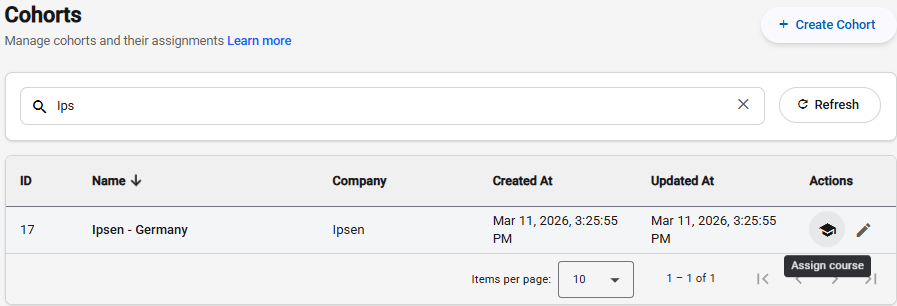
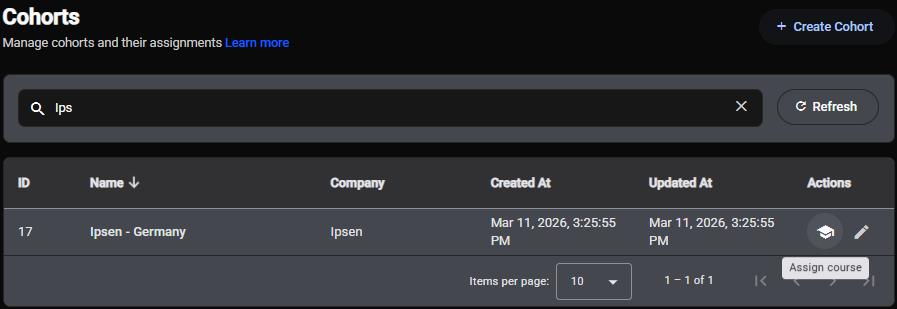
- Go to the Cohorts list and find the cohort you want to work with.
- Click the Assign course icon (the graduation cap) on the cohort's row.
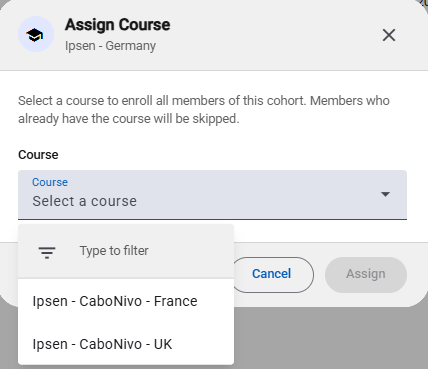
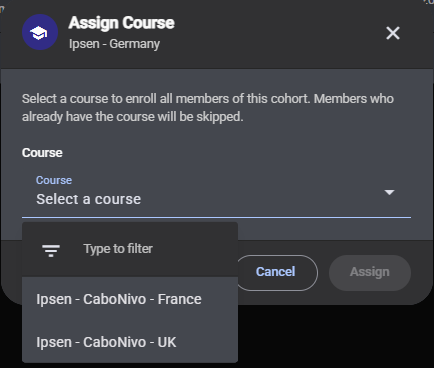
- The Assign Course dialog opens, showing the cohort name at the top.
- Select the course you want to assign from the Course dropdown. The list shows all courses available for that cohort's company.
- Click Assign.
The skip-if-already-enrolled rule
Menta checks each cohort member before creating any enrolment. If a member already has the selected course on their account, they are skipped - their existing enrolment is left untouched. Only members who do not yet have the course are newly enrolled.
This means it is safe to run the same assignment more than once. Re-assigning a course to a cohort after adding new members will enrol the new members and skip everyone who was already enrolled.
Reading the result summary
After the assignment completes, the dialog shows a summary:
- Newly enrolled - the number of cohort members who were just given access to the course.
- Already had the course - the number of members who were skipped because they were already enrolled.
If the cohort has no members at the time of assignment, both counts will be zero and no enrolments are created.
Click Done to close the dialog. No further action is required.
Good practices
- Assign before adding members. If you know which course a cohort will take, you can assign it while the cohort is still empty. Any members added later will need to be enrolled separately - the assignment only acts on members present at the time you click Assign.
- Use cohorts to manage course access at scale. Assigning through a cohort is much faster than enrolling users one by one, especially when onboarding large groups.
- Check the skipped count. A high skipped count on a first-time assignment may indicate that users were already enrolled through a previous import or individual assignment. That is not a problem, but it is worth being aware of.